Remote Desktop Guide
SRILS Server provides remote desktop access only on srils02. Please follow the instructions below for both internal and external network connections.
Supported Machines
- srils02: Remote desktop forwarding is supported (port 3383)
- srils01: Remote desktop is NOT available
Connection Methods
Internal Network
- Address:
02.srils.cn - Port:
3389(default) - How to connect: Use your remote desktop client and enter
02.srils.cnas the computer address. The default port 3389 will be used automatically.
External Network
- Address:
ext.srils.cn:52032 - Port:
52032 - How to connect: Use your remote desktop client and enter
ext.srils.cn:52032as the computer address. Make sure to specify port 52032.
Note: Do not forget to add the port number (
:52032) when connecting from the external network.
Example (Windows Remote Desktop)
 Example: Connect to 02.srils.cn (default port 3389)
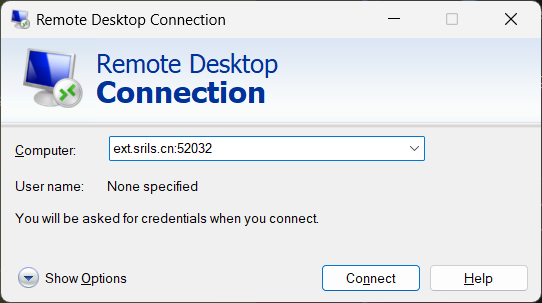 Example: Connect to ext.srils.cn:52032 (external port 52032)
Troubleshooting
- Ensure you are connecting to srils02 only; srils01 does not support remote desktop.
- If you cannot connect, verify your network and port settings.
- For further assistance, contact the SRILS Server administration team.
Related Guides:
- Apps Usage Guide - Main applications overview
- Jupyter Notebook Guide - Jupyter-specific information
- RStudio Server Guide - RStudio-specific information
- File Storage Guide - Storage and file management
Need help? Contact the SRILS Server administration team for remote desktop support.